<?xml version="1.0" encoding="utf-8"?><feed xmlns="http://www.w3.org/2005/Atom" xml:lang="en-US"><generator uri="https://jekyllrb.com/" version="3.10.0">Jekyll</generator><link href="https://rramsden.ca/index.xml" rel="self" type="application/atom+xml" /><link href="https://rramsden.ca/" rel="alternate" type="text/html" hreflang="en-US" /><updated>2026-07-05T16:02:48+09:00</updated><id>https://rramsden.ca/index.xml</id><title type="html">Keep It Simple Stupid</title><subtitle>Essays and notes on software, building things, and the occasional detour. Written to be read.</subtitle><author><name>Richard Ramsden</name></author><entry><title type="html">Loop Engineering Series - Part I</title><link href="https://rramsden.ca/posts/loop-engineering-series-part-i/" rel="alternate" type="text/html" title="Loop Engineering Series - Part I" /><published>2026-07-05T09:00:00+09:00</published><updated>2026-07-05T09:00:00+09:00</updated><id>https://rramsden.ca/posts/loop-engineering-series-part-i</id><content type="html" xml:base="https://rramsden.ca/posts/loop-engineering-series-part-i/"><![CDATA[<p>It’s 2026 and it’s all about the agent loop.</p>

<p>This guide follows my work understanding loop engineering. As I want to learn from the fundamentals I am building this tutorial part series under my blog where I will progressively cover more advanced concepts from the ground up.</p>

<p>Today we will build a simple weather assistant which will be a simple agentic loop with a tool call for fetching the weather in a city.</p>

<h2 id="dependencies">Dependencies</h2>

<p>There are a few dependencies we will need to follow along</p>

<h3 id="1-typescript-project-scaffold">1. Typescript Project Scaffold</h3>

<p>You will need to create a base project. In this case I am creating a very simple project scaffold using three package including openai which will use below</p>

<div class="language-bash highlighter-rouge"><div class="highlight"><pre class="highlight"><code><span class="nb">mkdir </span>tutorial-part-1 <span class="o">&amp;&amp;</span> <span class="nb">cd </span>tutorial-part-1
npm i <span class="nt">-D</span> typescript tsx openai
npx tsc <span class="nt">--init</span>
</code></pre></div></div>

<p>After installing the dependencies copy and paste the following into <code class="language-plaintext highlighter-rouge">package.json</code></p>

<div class="language-json highlighter-rouge"><div class="highlight"><pre class="highlight"><code><span class="p">{</span><span class="w">
  </span><span class="nl">"type"</span><span class="p">:</span><span class="w"> </span><span class="s2">"module"</span><span class="p">,</span><span class="w">
  </span><span class="nl">"scripts"</span><span class="p">:</span><span class="w"> </span><span class="p">{</span><span class="w">
    </span><span class="nl">"dev"</span><span class="p">:</span><span class="w"> </span><span class="s2">"npx tsx main.ts"</span><span class="w">
  </span><span class="p">},</span><span class="w">
  </span><span class="nl">"devDependencies"</span><span class="p">:</span><span class="w"> </span><span class="p">{</span><span class="w">
    </span><span class="nl">"openai"</span><span class="p">:</span><span class="w"> </span><span class="s2">"^6.45.0"</span><span class="p">,</span><span class="w">
    </span><span class="nl">"tsx"</span><span class="p">:</span><span class="w"> </span><span class="s2">"^4.23.0"</span><span class="p">,</span><span class="w">
    </span><span class="nl">"typescript"</span><span class="p">:</span><span class="w"> </span><span class="s2">"^6.0.3"</span><span class="w">
  </span><span class="p">}</span><span class="w">
</span><span class="p">}</span><span class="w">
</span></code></pre></div></div>

<p>Then create your <code class="language-plaintext highlighter-rouge">main.ts</code> file</p>

<div class="language-bash highlighter-rouge"><div class="highlight"><pre class="highlight"><code>console.log<span class="o">(</span><span class="s2">"Hello World!"</span><span class="o">)</span>
</code></pre></div></div>

<p>Finally run <code class="language-plaintext highlighter-rouge">npm run dev</code> to see if the project works</p>

<h3 id="2-llm-studio-desktop">2. LLM Studio Desktop</h3>

<p>Grab the latest version of LLM Studio (<a href="https://lmstudio.ai/">https://lmstudio.ai/</a>) and we will build an agent that uses a local model.</p>

<p>Once you boot up you will want to download a light-weight model (one that supports tool calling). Note, I am using <code class="language-plaintext highlighter-rouge">qwen-3-4b</code> for the examples below</p>

<h2 id="getting-started">Getting Started</h2>

<p>An agentic loop contains the following:</p>

<ul>
  <li>The loop (in this case a while loop)</li>
  <li>The LLM model for generating responses based on an input</li>
  <li>Available tool calls e.g. in our case today <code class="language-plaintext highlighter-rouge">get_weather</code></li>
</ul>

<p>Here is an example of the most simple agentic loop (minus tool calling):</p>

<div class="language-typescript highlighter-rouge"><div class="highlight"><pre class="highlight"><code><span class="k">import</span> <span class="p">{</span> <span class="nx">createInterface</span> <span class="p">}</span> <span class="k">from</span> <span class="dl">"</span><span class="s2">node:readline/promises</span><span class="dl">"</span>
<span class="k">import</span> <span class="p">{</span> <span class="nx">stdin</span> <span class="k">as</span> <span class="nx">input</span><span class="p">,</span> <span class="nx">stdout</span> <span class="k">as</span> <span class="nx">output</span> <span class="p">}</span> <span class="k">from</span> <span class="dl">"</span><span class="s2">node:process</span><span class="dl">"</span><span class="p">;</span>

<span class="kd">const</span> <span class="nx">SYSTEM_PROMPT</span> <span class="o">=</span> <span class="s2">`You are a weather assistant`</span><span class="p">;</span>
<span class="kd">const</span> <span class="nx">MODEL</span> <span class="o">=</span> <span class="dl">'</span><span class="s1">qwen/qwen3-4b</span><span class="dl">'</span><span class="p">;</span>

<span class="kd">const</span> <span class="nx">messages</span> <span class="o">=</span> <span class="p">[{</span> <span class="na">role</span><span class="p">:</span> <span class="dl">"</span><span class="s2">system</span><span class="dl">"</span><span class="p">,</span> <span class="na">content</span><span class="p">:</span> <span class="nx">SYSTEM_PROMPT</span> <span class="p">}];</span>

<span class="k">async</span> <span class="kd">function</span> <span class="nx">main</span><span class="p">()</span> <span class="p">{</span>
  <span class="kd">const</span> <span class="nx">rl</span> <span class="o">=</span> <span class="nx">createInterface</span><span class="p">({</span> <span class="nx">input</span><span class="p">,</span> <span class="nx">output</span> <span class="p">});</span>
  
  <span class="c1">// Gracefully handle CTRL+C on CLI</span>
  <span class="nx">rl</span><span class="p">.</span><span class="nx">on</span><span class="p">(</span><span class="dl">"</span><span class="s2">SIGINT</span><span class="dl">"</span><span class="p">,</span> <span class="k">async</span> <span class="p">()</span> <span class="o">=&gt;</span> <span class="p">{</span>
    <span class="nx">rl</span><span class="p">.</span><span class="nx">close</span><span class="p">();</span>
    <span class="nx">process</span><span class="p">.</span><span class="nx">exit</span><span class="p">(</span><span class="mi">0</span><span class="p">);</span>
  <span class="p">})</span>
  
  <span class="c1">// The agentic loop</span>
  <span class="k">while</span> <span class="p">(</span><span class="kc">true</span><span class="p">)</span> <span class="p">{</span>
    <span class="kd">let</span> <span class="nx">user_input</span> <span class="o">=</span> <span class="k">await</span> <span class="nx">rl</span><span class="p">.</span><span class="nx">question</span><span class="p">(</span><span class="dl">"</span><span class="s2">You&gt; </span><span class="dl">"</span><span class="p">);</span>
    <span class="nx">user_input</span> <span class="o">=</span> <span class="nx">user_input</span><span class="p">.</span><span class="nx">trim</span><span class="p">();</span> <span class="c1">// Strip any whitespace</span>
    
    <span class="c1">// Check if user has typed "exit"</span>
    <span class="k">if</span> <span class="p">(</span><span class="nx">user_input</span> <span class="o">==</span> <span class="dl">"</span><span class="s2">quit</span><span class="dl">"</span><span class="p">)</span> <span class="k">break</span><span class="p">;</span>
    
    <span class="c1">// Push the users question onto our context</span>
    <span class="nx">messages</span><span class="p">.</span><span class="nx">push</span><span class="p">({</span> <span class="na">role</span><span class="p">:</span> <span class="dl">"</span><span class="s2">user</span><span class="dl">"</span><span class="p">,</span> <span class="na">content</span><span class="p">:</span> <span class="nx">user_input</span> <span class="p">});</span>
    
    <span class="c1">// Mock out an LLM response from the user input</span>
    <span class="kd">let</span> <span class="nx">mocked_response</span> <span class="o">=</span> <span class="p">{</span> <span class="na">role</span><span class="p">:</span> <span class="dl">"</span><span class="s2">assistant</span><span class="dl">"</span><span class="p">,</span> <span class="na">content</span><span class="p">:</span> <span class="dl">"</span><span class="s2">Hello!</span><span class="dl">"</span> <span class="p">};</span>
    <span class="nx">messages</span><span class="p">.</span><span class="nx">push</span><span class="p">(</span><span class="nx">mocked_response</span><span class="p">);</span>
    
    <span class="nx">console</span><span class="p">.</span><span class="nx">log</span><span class="p">(</span><span class="s2">`Assistant&gt; </span><span class="p">${</span><span class="nx">mocked_response</span><span class="p">.</span><span class="nx">content</span><span class="p">}</span><span class="s2">\n\n`</span><span class="p">);</span>
  <span class="p">}</span>
<span class="p">}</span>
</code></pre></div></div>

<h2 id="prompting-the-llm-model">Prompting the LLM model</h2>

<p>The first step to prompting a real LLM is to initialize an OpenAI wrapper so we can communicate with LMStudio. LMStudio supports OpenAI’s API under the hood and allows us to route to local models using it.</p>

<p>You will need to enable the “Developer Server” and in “Server Settings” and listen on your local network. It should then give you an IP address to make requests.</p>

<p>Once you have the IP address the server is binded on you can copy and paste this into the OpenAI wrapper as follows (note, a dummy password should be okay if password protection is disabled):</p>

<div class="language-typescript highlighter-rouge"><div class="highlight"><pre class="highlight"><code><span class="kd">const</span> <span class="nx">client</span> <span class="o">=</span> <span class="k">new</span> <span class="nx">OpenAI</span><span class="p">({</span>
  <span class="na">baseURL</span><span class="p">:</span> <span class="dl">"</span><span class="s2">http://100.121.13.119:1234/v1</span><span class="dl">"</span><span class="p">,</span>
  <span class="na">apiKey</span><span class="p">:</span> <span class="dl">'</span><span class="s1">dummy_value</span><span class="dl">'</span>
<span class="p">});</span>
</code></pre></div></div>

<p>Next let’s replace the mocked call out example above with an OpenAI completion request:</p>

<div class="language-typescript highlighter-rouge"><div class="highlight"><pre class="highlight"><code><span class="c1">// Call our model and push the response to messages</span>
<span class="kd">const</span> <span class="nx">completion</span> <span class="o">=</span> <span class="k">await</span> <span class="nx">client</span><span class="p">.</span><span class="nx">chat</span><span class="p">.</span><span class="nx">completions</span><span class="p">.</span><span class="nx">create</span><span class="p">({</span>
  <span class="na">model</span><span class="p">:</span> <span class="nx">MODEL</span><span class="p">,</span>
  <span class="nx">messages</span><span class="p">,</span>
<span class="p">});</span>
<span class="kd">const</span> <span class="nx">reply</span> <span class="o">=</span> <span class="nx">completion</span><span class="p">.</span><span class="nx">choices</span><span class="p">[</span><span class="mi">0</span><span class="p">].</span><span class="nx">message</span><span class="p">;</span>
<span class="nx">messages</span><span class="p">.</span><span class="nx">push</span><span class="p">(</span><span class="nx">reply</span><span class="p">);</span>

</code></pre></div></div>

<p>We should now be able to have a conversation with our agent now :)</p>

<div class="language-plaintext highlighter-rouge"><div class="highlight"><pre class="highlight"><code>You&gt; Hello
Assistant&gt;

Hello! How can I assist you today? If you need weather information or have any questions about the forecast, feel free to ask! 🌤️ 

You&gt; What's the weather, right now, in Tokyo, Japan.
Assistant&gt;

I currently don’t have access to live weather data or internet resources to provide the exact current weather in Tokyo. However, I can share that Tokyo typically has a humid subtropical climate, so:

- **Summer** (June–August): Hot and rainy, with temperatures often exceeding 30°C (86°F).
- **Winter** (December–February): Mild and mostly sunny, with temperatures averaging around 10–15°C (50–59°F).

For the most accurate and up-to-date information, I recommend checking a reliable weather service like [AccuWeather](https://www.accuweather.com) or [The Weather Channel](https://www.weather.com). Let me know if you’d like help with something else! 🌤️ 
</code></pre></div></div>

<h2 id="adding-tool-calls">Adding tool calls</h2>

<p>In the example above our LLM doesn’t have the ability to call tools so when its asked for real-time data it doesn’t work.</p>

<p>Will expand our program to include a <code class="language-plaintext highlighter-rouge">tools.ts</code> file which will contain define our tool available to our agent:</p>

<div class="language-typescript highlighter-rouge"><div class="highlight"><pre class="highlight"><code><span class="c1">// tools.ts</span>
<span class="k">export</span> <span class="kd">const</span> <span class="nx">metadata</span> <span class="o">=</span> <span class="p">[</span>
  <span class="p">{</span>
    <span class="na">type</span><span class="p">:</span> <span class="dl">"</span><span class="s2">function</span><span class="dl">"</span><span class="p">,</span>
    <span class="na">function</span><span class="p">:</span> <span class="p">{</span>
      <span class="na">name</span><span class="p">:</span> <span class="dl">"</span><span class="s2">get_weather</span><span class="dl">"</span><span class="p">,</span>
      <span class="na">description</span><span class="p">:</span>
        <span class="dl">"</span><span class="s2">Fetch current weather for a location. You may pass just a city name (e.g. 'Tokyo'), or add a country/region qualifier after a comma to disambiguate (e.g. 'San Francisco, US' or 'Portland, Oregon').</span><span class="dl">"</span><span class="p">,</span>
      <span class="na">parameters</span><span class="p">:</span> <span class="p">{</span>
        <span class="na">type</span><span class="p">:</span> <span class="dl">"</span><span class="s2">object</span><span class="dl">"</span><span class="p">,</span>
        <span class="na">required</span><span class="p">:</span> <span class="p">[</span><span class="dl">"</span><span class="s2">location</span><span class="dl">"</span><span class="p">],</span>
        <span class="na">properties</span><span class="p">:</span> <span class="p">{</span>
          <span class="na">location</span><span class="p">:</span> <span class="p">{</span>
            <span class="na">type</span><span class="p">:</span> <span class="dl">"</span><span class="s2">string</span><span class="dl">"</span><span class="p">,</span>
            <span class="na">description</span><span class="p">:</span>
              <span class="dl">'</span><span class="s1">City name, optionally with a country/region after a comma, e.g. "Tokyo", "San Francisco, US", or "Portland, Oregon".</span><span class="dl">'</span><span class="p">,</span>
          <span class="p">}</span>
        <span class="p">}</span>
      <span class="p">}</span>
    <span class="p">}</span>
  <span class="p">}</span>
<span class="p">];</span>

</code></pre></div></div>

<p>Next in <code class="language-plaintext highlighter-rouge">main.ts</code> import the tools and pass them into the completions API call:</p>

<div class="language-typescript highlighter-rouge"><div class="highlight"><pre class="highlight"><code><span class="k">import</span> <span class="p">{</span> <span class="nx">metadata</span> <span class="p">}</span> <span class="k">from</span> <span class="dl">"</span><span class="s2">./tools</span><span class="dl">"</span>

<span class="kd">const</span> <span class="nx">completion</span> <span class="o">=</span> <span class="k">await</span> <span class="nx">client</span><span class="p">.</span><span class="nx">chat</span><span class="p">.</span><span class="nx">completions</span><span class="p">.</span><span class="nx">create</span><span class="p">({</span>
  <span class="na">model</span><span class="p">:</span> <span class="nx">MODEL</span><span class="p">,</span>
  <span class="nx">messages</span><span class="p">,</span>
  <span class="na">tools</span><span class="p">:</span> <span class="nx">metadata</span> <span class="c1">// &lt;---------</span>
<span class="p">});</span>
</code></pre></div></div>

<p>As an experiment we can now ask our model if it has access to any tools:</p>

<div class="language-plaintext highlighter-rouge"><div class="highlight"><pre class="highlight"><code>You&gt; What tools do you have access to?
Assistant&gt;

I have access to a weather tool that allows me to fetch current weather information for any location. You can simply provide a city name (e.g., "New York") or specify a location with country/region details (e.g., "London, UK" or "Sydney, Australia"). Would you like me to check the weather for a specific place?
</code></pre></div></div>

<p>At this point if you ask for the weather in a specific city it will return nothing as we have not defined the function yet. Let’s define <code class="language-plaintext highlighter-rouge">get_weather</code>:</p>

<div class="language-typescript highlighter-rouge"><div class="highlight"><pre class="highlight"><code><span class="c1">// tools.ts</span>
<span class="k">export</span> <span class="k">async</span> <span class="kd">function</span> <span class="nx">get_weather</span><span class="p">(</span><span class="nx">location</span><span class="p">:</span> <span class="kr">string</span><span class="p">):</span> <span class="nb">Promise</span><span class="o">&lt;</span><span class="kr">string</span><span class="o">&gt;</span> <span class="p">{</span>
  <span class="k">try</span> <span class="p">{</span>
    <span class="c1">// Native fetch with an 8-second timeout inline</span>
    <span class="kd">const</span> <span class="nx">res</span> <span class="o">=</span> <span class="k">await</span> <span class="nx">fetch</span><span class="p">(</span><span class="s2">`https://wttr.in/</span><span class="p">${</span><span class="nb">encodeURIComponent</span><span class="p">(</span><span class="nx">location</span><span class="p">)}</span><span class="s2">?format=j1`</span><span class="p">,</span> <span class="p">{</span>
      <span class="na">signal</span><span class="p">:</span> <span class="nx">AbortSignal</span><span class="p">.</span><span class="nx">timeout</span><span class="p">(</span><span class="mi">8000</span><span class="p">)</span>
    <span class="p">});</span>
    
    <span class="k">if</span> <span class="p">(</span><span class="o">!</span><span class="nx">res</span><span class="p">.</span><span class="nx">ok</span><span class="p">)</span> <span class="k">throw</span> <span class="k">new</span> <span class="nb">Error</span><span class="p">(</span><span class="s2">`HTTP </span><span class="p">${</span><span class="nx">res</span><span class="p">.</span><span class="nx">status</span><span class="p">}</span><span class="s2"> </span><span class="p">${</span><span class="nx">res</span><span class="p">.</span><span class="nx">statusText</span><span class="p">}</span><span class="s2">`</span><span class="p">);</span>
    <span class="kd">const</span> <span class="nx">wx</span> <span class="o">=</span> <span class="k">await</span> <span class="nx">res</span><span class="p">.</span><span class="nx">json</span><span class="p">();</span>
    
    <span class="kd">const</span> <span class="nx">current</span> <span class="o">=</span> <span class="nx">wx</span><span class="p">.</span><span class="nx">current_condition</span><span class="p">?.[</span><span class="mi">0</span><span class="p">];</span>
    <span class="kd">const</span> <span class="nx">area</span> <span class="o">=</span> <span class="nx">wx</span><span class="p">.</span><span class="nx">nearest_area</span><span class="p">?.[</span><span class="mi">0</span><span class="p">];</span>
    <span class="k">if</span> <span class="p">(</span><span class="o">!</span><span class="nx">current</span> <span class="o">||</span> <span class="o">!</span><span class="nx">area</span><span class="p">)</span> <span class="k">return</span> <span class="s2">`Weather data unavailable for </span><span class="p">${</span><span class="nx">location</span><span class="p">}</span><span class="s2">.`</span><span class="p">;</span>

    <span class="kd">const</span> <span class="nx">name</span> <span class="o">=</span> <span class="nx">area</span><span class="p">.</span><span class="nx">areaName</span><span class="p">?.[</span><span class="mi">0</span><span class="p">]?.</span><span class="nx">value</span> <span class="o">||</span> <span class="nx">location</span><span class="p">;</span>
    <span class="kd">const</span> <span class="nx">country</span> <span class="o">=</span> <span class="nx">area</span><span class="p">.</span><span class="nx">country</span><span class="p">?.[</span><span class="mi">0</span><span class="p">]?.</span><span class="nx">value</span> <span class="o">||</span> <span class="dl">""</span><span class="p">;</span>
    <span class="kd">const</span> <span class="p">{</span> <span class="na">temp_C</span><span class="p">:</span> <span class="nx">temp</span><span class="p">,</span> <span class="na">windspeedKmph</span><span class="p">:</span> <span class="nx">wind</span><span class="p">,</span> <span class="na">cloudcover</span><span class="p">:</span> <span class="nx">clouds</span> <span class="p">}</span> <span class="o">=</span> <span class="nx">current</span><span class="p">;</span>
    <span class="kd">const</span> <span class="nx">condition</span> <span class="o">=</span> <span class="nx">current</span><span class="p">.</span><span class="nx">weatherDesc</span><span class="p">?.[</span><span class="mi">0</span><span class="p">]?.</span><span class="nx">value</span> <span class="o">||</span> <span class="dl">"</span><span class="s2">Unknown</span><span class="dl">"</span><span class="p">;</span>

    <span class="k">return</span> <span class="s2">`</span><span class="p">${</span><span class="nx">name</span><span class="p">}${</span><span class="nx">country</span> <span class="p">?</span> <span class="s2">`, </span><span class="p">${</span><span class="nx">country</span><span class="p">}</span><span class="s2">`</span> <span class="p">:</span> <span class="dl">""</span><span class="p">}</span><span class="s2">: </span><span class="p">${</span><span class="nx">temp</span><span class="p">}</span><span class="s2">°C, wind </span><span class="p">${</span><span class="nx">wind</span><span class="p">}</span><span class="s2"> km/h, cloud coverage: </span><span class="p">${</span><span class="nx">clouds</span><span class="p">}</span><span class="s2">% (</span><span class="p">${</span><span class="nx">condition</span><span class="p">}</span><span class="s2">)`</span><span class="p">;</span>
  <span class="p">}</span> <span class="k">catch</span> <span class="p">(</span><span class="nx">err</span><span class="p">)</span> <span class="p">{</span>
    <span class="k">return</span> <span class="s2">`Sorry, I couldn't fetch the weather for "</span><span class="p">${</span><span class="nx">location</span><span class="p">}</span><span class="s2">" right now (</span><span class="p">${</span><span class="nx">err</span> <span class="k">instanceof</span> <span class="nb">Error</span> <span class="p">?</span> <span class="nx">err</span><span class="p">.</span><span class="nx">message</span> <span class="p">:</span> <span class="nx">err</span><span class="p">}</span><span class="s2">). Please try again shortly.`</span><span class="p">;</span>
  <span class="p">}</span>
<span class="p">}</span>
</code></pre></div></div>

<p>Once defined you will need to handle the first response from our LLM model which will ask to invoke tooling.</p>

<p>You can do this by checking the reply from the first completion and looping through <code class="language-plaintext highlighter-rouge">tool_calls</code> array in the reply:</p>

<div class="language-typescript highlighter-rouge"><div class="highlight"><pre class="highlight"><code><span class="c1">// Call our model with our user input</span>
<span class="kd">const</span> <span class="nx">completion</span> <span class="o">=</span> <span class="k">await</span> <span class="nx">client</span><span class="p">.</span><span class="nx">chat</span><span class="p">.</span><span class="nx">completions</span><span class="p">.</span><span class="nx">create</span><span class="p">({</span>
  <span class="na">model</span><span class="p">:</span> <span class="nx">MODEL</span><span class="p">,</span>
  <span class="nx">messages</span><span class="p">,</span>
  <span class="na">tools</span><span class="p">:</span> <span class="nx">metadata</span>
<span class="p">});</span>
<span class="kd">const</span> <span class="nx">reply</span> <span class="o">=</span> <span class="nx">completion</span><span class="p">.</span><span class="nx">choices</span><span class="p">[</span><span class="mi">0</span><span class="p">].</span><span class="nx">message</span><span class="p">;</span>

<span class="c1">// Check if the model requested any tool calls</span>
<span class="k">if</span> <span class="p">(</span><span class="nx">reply</span><span class="p">.</span><span class="nx">tool_calls</span> <span class="o">&amp;&amp;</span> <span class="nx">reply</span><span class="p">.</span><span class="nx">tool_calls</span><span class="p">.</span><span class="nx">length</span> <span class="o">&gt;</span> <span class="mi">0</span><span class="p">)</span> <span class="p">{</span>
  <span class="k">for</span> <span class="p">(</span><span class="kd">const</span> <span class="nx">toolCall</span> <span class="k">of</span> <span class="nx">reply</span><span class="p">.</span><span class="nx">tool_calls</span><span class="p">)</span> <span class="p">{</span>
    <span class="k">if</span> <span class="p">(</span><span class="nx">toolCall</span><span class="p">.</span><span class="kd">function</span><span class="p">.</span><span class="nx">name</span> <span class="o">==</span> <span class="dl">"</span><span class="s2">get_weather</span><span class="dl">"</span><span class="p">)</span> <span class="p">{</span>
      <span class="kd">const</span> <span class="nx">args</span> <span class="o">=</span> <span class="nx">JSON</span><span class="p">.</span><span class="nx">parse</span><span class="p">(</span><span class="nx">toolCall</span><span class="p">.</span><span class="kd">function</span><span class="p">.</span><span class="nx">arguments</span><span class="p">)</span>
      <span class="kd">const</span> <span class="nx">toolResult</span> <span class="o">=</span> <span class="nx">get_weather</span><span class="p">(</span><span class="nx">args</span><span class="p">.</span><span class="nx">location</span><span class="p">);</span>
      
      <span class="nx">messages</span><span class="p">.</span><span class="nx">push</span><span class="p">({</span>
        <span class="na">role</span><span class="p">:</span> <span class="dl">"</span><span class="s2">tool</span><span class="dl">"</span><span class="p">,</span>
        <span class="na">tool_call_id</span><span class="p">:</span> <span class="nx">toolCall</span><span class="p">.</span><span class="nx">id</span><span class="p">,</span>
        <span class="na">content</span><span class="p">:</span> <span class="nx">toolResult</span>
      <span class="p">});</span>
    <span class="p">}</span>
  <span class="p">}</span>
<span class="p">}</span>

<span class="c1">// Finally follow up with results from any tools calls or initial output</span>
<span class="kd">const</span> <span class="nx">followup</span> <span class="o">=</span> <span class="k">await</span> <span class="nx">client</span><span class="p">.</span><span class="nx">chat</span><span class="p">.</span><span class="nx">completions</span><span class="p">.</span><span class="nx">create</span><span class="p">({</span>
  <span class="na">model</span><span class="p">:</span> <span class="nx">MODEL</span><span class="p">,</span>
  <span class="na">tools</span><span class="p">:</span> <span class="nx">metadata</span><span class="p">,</span>
  <span class="nx">messages</span><span class="p">,</span>
<span class="p">});</span>
<span class="kd">const</span> <span class="nx">finalMessage</span> <span class="o">=</span> <span class="nx">followup</span><span class="p">.</span><span class="nx">choices</span><span class="p">[</span><span class="mi">0</span><span class="p">].</span><span class="nx">message</span><span class="p">;</span>
<span class="nx">messages</span><span class="p">.</span><span class="nx">push</span><span class="p">(</span><span class="nx">finalMessage</span><span class="p">);</span>
</code></pre></div></div>

<p>You should now be able to see the result inside the reply:</p>

<div class="language-plaintext highlighter-rouge"><div class="highlight"><pre class="highlight"><code>You&gt; What's the weather in Tokyo?
Assistant&gt;

The current weather in Tokyo is 26°C, with winds at 36 km/h and light cloud coverage of 25%.
</code></pre></div></div>

<h2 id="fixing-the-format">Fixing the format</h2>

<p>If we don’t fix the format of our agent it will always come up with some unique response. That’s usually undesirable if were trying to get deterministic results.</p>

<p>We can fix this with a slight system prompt update</p>

<div class="language-typescript highlighter-rouge"><div class="highlight"><pre class="highlight"><code><span class="kd">const</span> <span class="nx">SYSTEM_PROMPT</span> <span class="o">=</span> <span class="s2">`
You are a weather assistant.

When you report weather for a location, your reply to the user MUST use exactly this format and nothing else:

Here is the weather information for &lt;city&gt;, &lt;country&gt;:

🌡️ &lt;temp&gt;°C
💨 wind &lt;speed&gt; km/h
☁️ cloud coverage &lt;cloud coverage&gt;%

If the lookup failed for any reason, reply with exactly one line:
⚠️ &lt;one concise sentence explaining why&gt;

Do not add greetings, extra commentary, or markdown code fences.
`</span><span class="p">;</span>
</code></pre></div></div>

<p>Now let’s try again</p>

<div class="language-plaintext highlighter-rouge"><div class="highlight"><pre class="highlight"><code>You&gt; What's the weather in Tokyo?
Assistant&gt;

Here is the weather information for Shikinejima, Japan:

🌡️ 26°C
💨 wind 36 km/h
☁️ cloud coverage 25%
</code></pre></div></div>

<p>Perfect. That’s it for the first tutorial. We now have an agent that will tell us the weather to any location
in a fixed format. If you can imagine we can create much more complex agents. Once they have the ability to call tools we can do some pretty complicated stuff!</p>]]></content><author><name>Richard Ramsden</name></author><category term="programming" /><category term="tutorial" /><category term="ai" /><category term="agents" /><category term="typescript" /><category term="openai" /><summary type="html"><![CDATA[It’s 2026 and it’s all about the agent loop.]]></summary></entry><entry><title type="html">Advice for the New CTO</title><link href="https://rramsden.ca/posts/advice-for-the-new-cto/" rel="alternate" type="text/html" title="Advice for the New CTO" /><published>2020-05-02T22:18:00+09:00</published><updated>2020-05-02T22:18:00+09:00</updated><id>https://rramsden.ca/posts/advice-for-the-new-cto</id><content type="html" xml:base="https://rramsden.ca/posts/advice-for-the-new-cto/"><![CDATA[<p>Being a CTO at a small startup with 2-3 people was exciting. Titles didn’t matter, they had no weight except when pitching to investors. All that mattered back then was how fast you could put together a working prototype together.</p>

<p>When I was promoted to CTO at a much larger company that’s when I struggled. One of the biggest challenges was actually the title itself. In my case, I went from being a productive engineer to worrying about how others viewed me at the company and if I was living up to expectations. Your classic case of <a href="https://en.wikipedia.org/wiki/Impostor_syndrome">Imposter syndrome</a> .</p>

<p>How long did it take me to overcome my imposter syndrome? About two years! and a lot of sleepless nights. Luckily for me I had a good mentor with a lot of patience. I still don’t feel comfortable on some days but I’ve learned to trust that usually means your heading in the right direction.</p>

<p>Looking back there were a few pointers I wish I knew beforehand that I want to share.</p>

<h3 id="technical-cto-or-manager-cto">Technical CTO or Manager CTO</h3>

<p>The biggest problem with the CTO title is that no one really defines the role for you. The reality is the job changes as the needs of your company change.</p>

<p>If you are confused about what to do next, ask yourself what your organization is lacking and head in that direction. For me, we needed talent so I focused heavily on recruiting one quarter. When we brought in competent engineers I focused on mentorship and performance. Then one quarter I was back working on technical side of things.</p>

<p>The reality is your role will change with the company so there isn’t a guidebook on being successful in this role.</p>

<h3 id="dont-lead-by-title">Don’t Lead by Title</h3>

<p>Don’t refer to yourself using your title. I have found titles are good for rewarding hard work but have little meaning in modern organizations.</p>

<p>Introduce yourself as a “team lead” or “leading the engineering teams at X company”. I still remember introducing myself during a meeting with a client. I was quickly met by a sarcastic <em>” Whoa, we’re talking to a CTO!”</em>. It leaves a weird awkwardness which is not really needed in the first place.</p>

<p>It’s better to ditch the title early and talk to people on the same level. I would even go as far as removing it from your business card.</p>

<p>It sounds simple enough but it’s hard to drop your ego if you have one. The faster you can forget about your title the quicker you can get on with real work!</p>

<h3 id="people-pleasing">People Pleasing</h3>

<p>I do and still often like to please people. This has helped me succeed quickly in my early career as a software developer as I would take on large amounts of work to please upper management.</p>

<p>When you become responsible for people this strategy quickly backfires on you. I was lucky enough to get direct feedback from a peer and course correct early.</p>

<p>If you don’t know what people pleasing looks like here are a few signs:</p>

<ul>
  <li>You settle for mediocre because you don’t want hurt an engineers feelings.</li>
  <li>You try to make excuses for low performers and lower their bar compared to the rest of the team.</li>
  <li>You find yourself running around trying to please an engineer that is upset with your company culture.</li>
</ul>

<p>Heed this warning, if you are too nice you don’t communicate direct feedback your team members desperately need to improve. Worse, you keep a disruptive team member in your company longer.</p>

<h3 id="mind-games">Mind Games</h3>

<p>Jealously, fear, anxiety, I have these all and my mind still messes with me. However, if you can push through the discomfort and accept failure as a learning experience you quickly adapt and don’t get easily phased when there’s problems.</p>

<h3 id="conclusion">Conclusion</h3>

<p>Congratulations on the promotion, your challenge in the new role will be yourself! My advice, keep calm and try things that make you uncomfortable, this is the best way to learn and the quickest way to build a hard skin.</p>]]></content><author><name>Richard Ramsden</name></author><category term="leadership" /><category term="career" /><summary type="html"><![CDATA[Being a CTO at a small startup with 2-3 people was exciting. Titles didn’t matter, they had no weight except when pitching to investors. All that mattered back then was how fast you could put together a working prototype together.]]></summary></entry><entry><title type="html">Lets Build a Mechanical Keyboard</title><link href="https://rramsden.ca/posts/lets-build-a-keyboard/" rel="alternate" type="text/html" title="Lets Build a Mechanical Keyboard" /><published>2020-02-29T17:42:44+09:00</published><updated>2020-02-29T17:42:44+09:00</updated><id>https://rramsden.ca/posts/lets-build-a-keyboard</id><content type="html" xml:base="https://rramsden.ca/posts/lets-build-a-keyboard/"><![CDATA[<p>I’ve been pretty interested in mechanical keyboards lately. Building one has been on my bucket list for awhile now so last weekend I decided to check out <a href="https://yushakobo.jp/">Yusha Kobo</a> , a specialty keyboard store based in Tokyo which sells kits.</p>

<p>I purchased my first build kit the <a href="https://eucalyn.shop/shop/kits/mint60-starter">Mint60</a> which a split keyboard. The 60 standing for the 60% keyboard layout which is a popular form factor for hobby keyboards.</p>

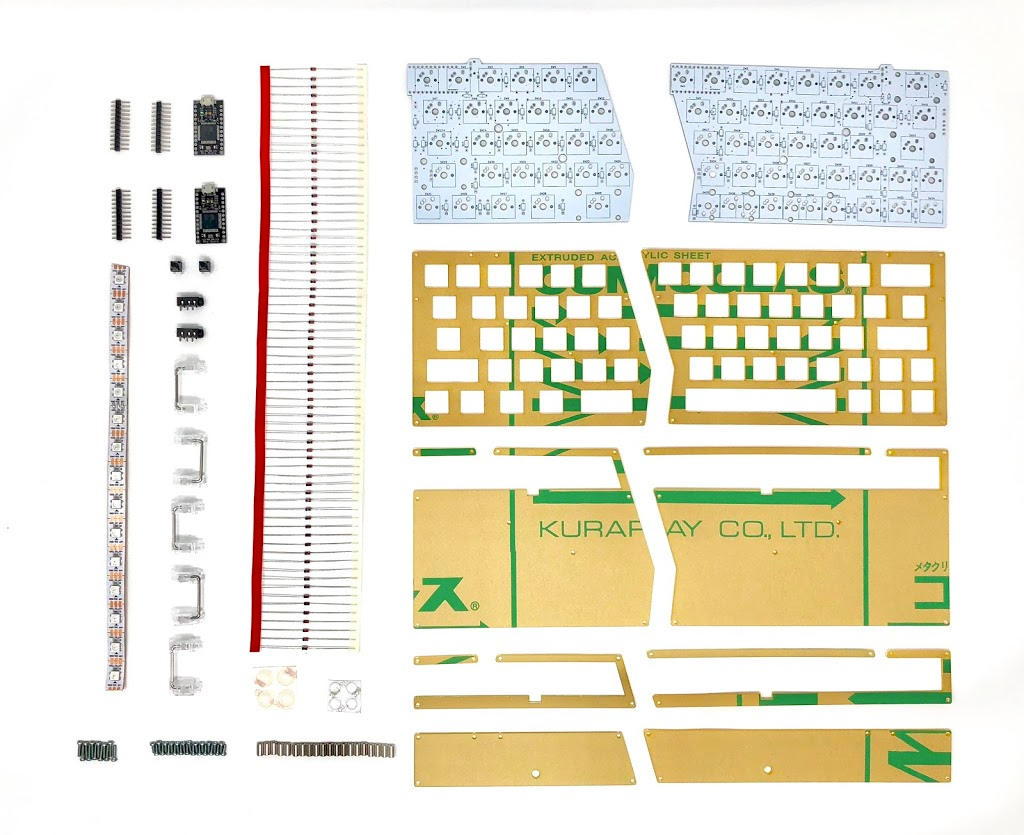
<p>My Mint60 build kit comes with the following:</p>

<ul>
  <li>A transparent keyboard casing</li>
  <li>Screws (spacer x20, 5mm x 28, 8mm x 12)</li>
  <li>CherryPCB Stablisers x5</li>
  <li>ProMicro Arduino x2</li>
  <li>TRRS Audio Jack x2</li>
  <li>RGB LED Strip</li>
  <li>Reset Switch x2</li>
  <li>And a lot of resistors</li>
</ul>

<p><a href="/assets/img/mech-keyboard/mech-kit.png"><img src="/assets/img/mech-keyboard/mech-kit.png" alt="" /></a> <em>(Image credit Yusha Kobo)</em></p>

<p>Note, build kits sold at Yusha Kobo (and most online stores) <strong>don ‘t include key switches or key caps</strong>. These have to be purchased seperately with your kit. The Mint60 has 66 keys so I needed to purchase 66 switches and the key caps seperately.</p>

<h3 id="what-do-i-need-to-put-a-kit-together">What do I need to put a kit together?</h3>

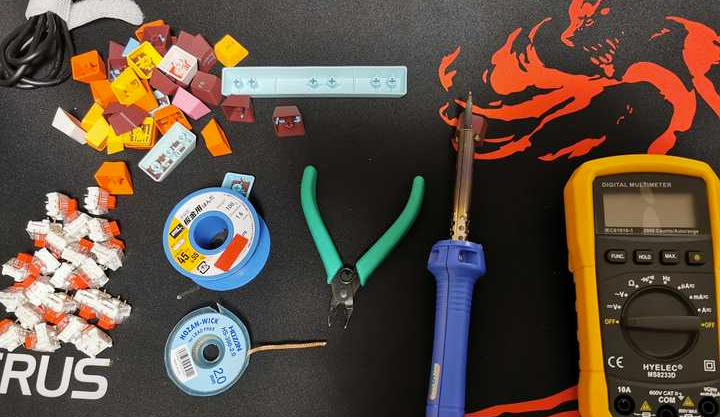
<ul>
  <li>A keyboard starter kit (includes a pcb, mirocontroller, keyboard stablizers, case, etc.)</li>
  <li>Your own keyboard switches and caps (If not included in your kit)</li>
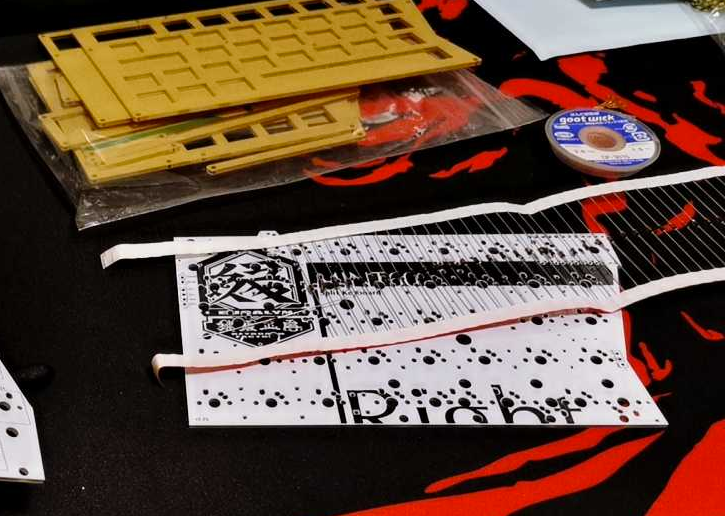
  <li>Soldering gear (solder, soldering iron, copper wick)</li>
  <li>A pair for small wire cutters</li>
  <li>A multi-meter for debugging (optional)</li>
  <li>A lot of patience</li>
</ul>

<p>Note, you probably won’t need a multi-meter but it may help if you made mistakes soldering. I ended up using a multi-meter to test my switches and some components for <a href="https://www.youtube.com/watch?v=OOK8np4t40c">continuity</a> .</p>

<p><a href="/assets/img/mech-keyboard/what-do-i-need.png"><img src="/assets/img/mech-keyboard/what-do-i-need.png" alt="" /></a></p>

<h3 id="key-switches">Key switches</h3>

<p>One of the most rewarding parts of building your own keyboard is selecting your own key switches. Here’s a great <a href="https://www.youtube.com/watch?v=CbPCqVsX-wQ">YouTube video</a> for finding the right switch for you.</p>

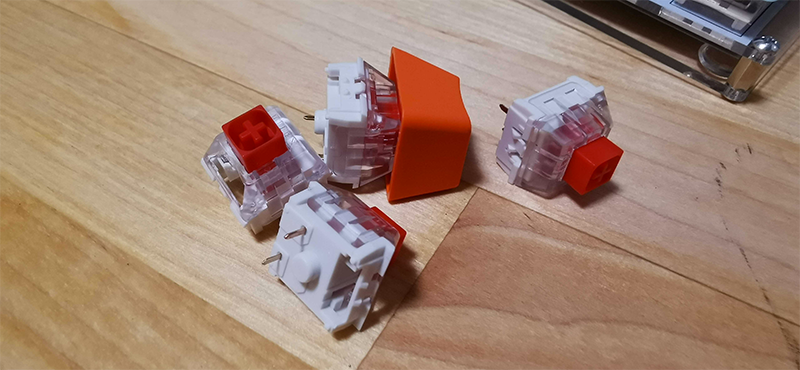
<p>In the end I chose Cherry MX red switches (80 for around 3000 JPY) at Yusha Kobo. These are soft to press and don’t make much noise.</p>

<p><a href="/assets/img/mech-keyboard/mech-keyboard-switch.png"><img src="/assets/img/mech-keyboard/mech-keyboard-switch.png" alt="" /></a></p>

<h3 id="keyboard-caps">Keyboard caps</h3>

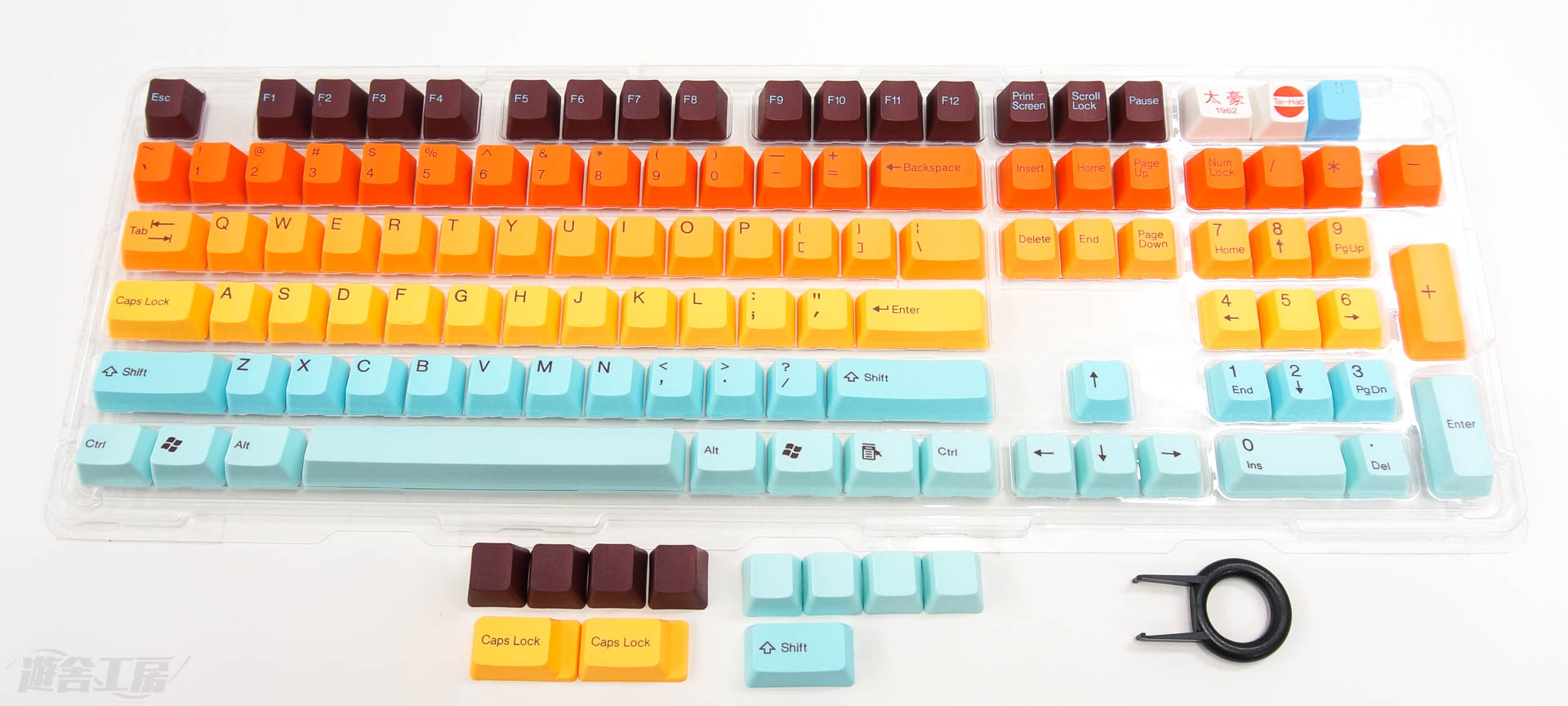
<p>For this build I chose <a href="https://yushakobo.jp/shop/tai-hao-pbt-hawaii/">Tai-Hao PBT Hawaii</a> keycap set which I bought at Yusha Kobo.</p>

<p><a href="/assets/img/mech-keyboard/mech-hawaii.jpg"><img src="/assets/img/mech-keyboard/mech-hawaii.jpg" alt="" /></a> <em>(Image credit Yusha Kobo)</em></p>

<h3 id="before-you-get-started">Before you get started</h3>

<ul>
  <li><strong>Solder your microcontroller LAST!</strong> *</li>
</ul>

<p>If you’re stupid like me you might solder your microcontroller on before your key switches. Don’t be stupid like me.</p>

<p>Once you solder on the microcontroller <strong>you can no longer solder any key switches above it</strong>. This may not be true for most kits but this was the case for the Mint60 kit I bought 🤦</p>

<p><a href="/assets/img/mech-keyboard/mech-keyboard-mistake01.png"><img src="/assets/img/mech-keyboard/mech-keyboard-mistake01.png" alt="" /></a></p>

<ul>
  <li><strong>Make sure your switches are soldered in completely</strong> *</li>
</ul>

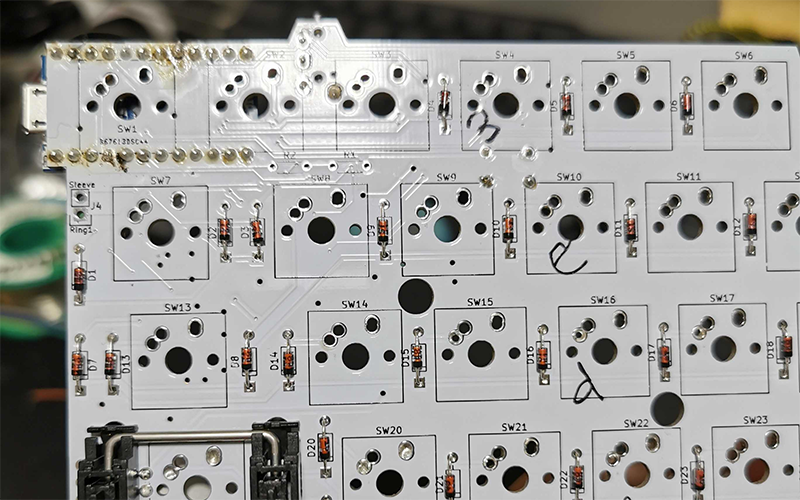
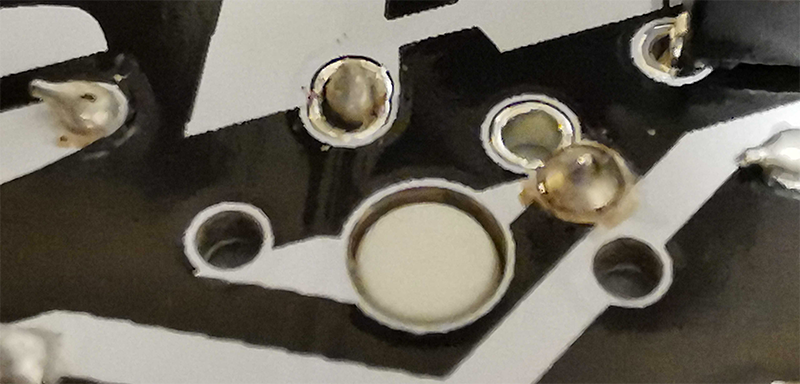
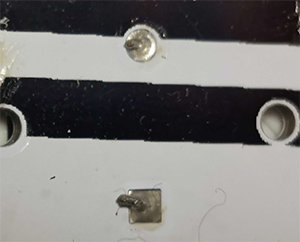
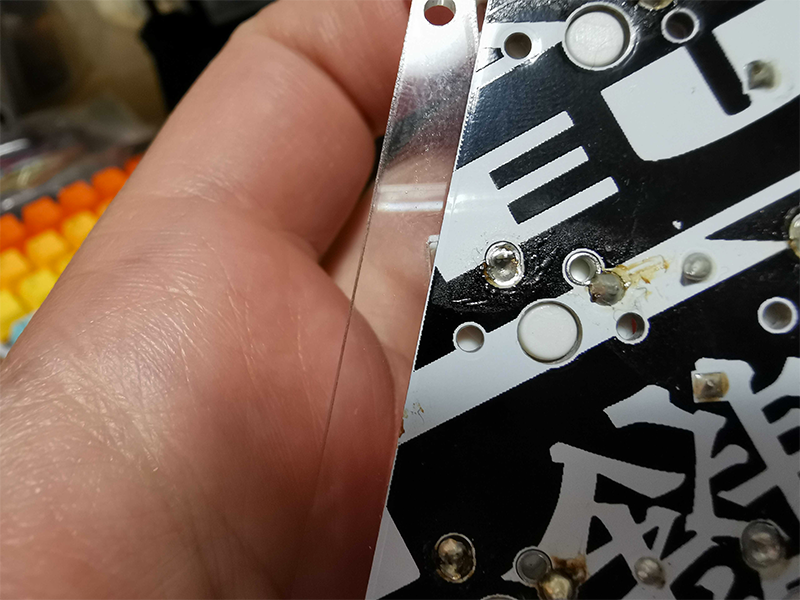
<p>When I put everything together and plugged the keyboard in I noticed some keys didn’t work. Taking a closer look you can see a small gap in the pin hole which holds the key switch.</p>

<p>When soldering you should always make sure to cover pin holes completely in solder otherwise they can spring loose which is what happened here.</p>

<p><a href="/assets/img/mech-keyboard/mech-keyboard-mistake02.png"><img src="/assets/img/mech-keyboard/mech-keyboard-mistake02.png" alt="" /></a></p>

<p>When soldering you want to make sure you cover each pin hole completely in solder and have a nice cone shape like the pin on the right in the above photo.</p>

<h3 id="getting-started">Getting started</h3>

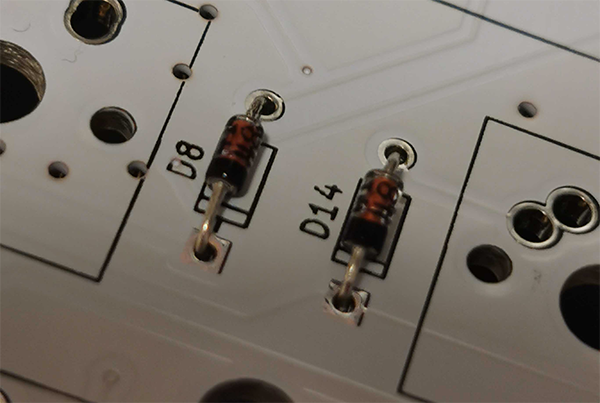
<p>The first thing is soldering in <strong>resistors</strong>. If your PCB does not have these soldered in already you will have to manually do this. Resistors are needed to prevent voltage from fluctuating and randomly triggering key presses. More on why resitors are needed <a href="https://www.arduino.cc/en/tutorial/button">here</a> .</p>

<p><a href="/assets/img/mech-keyboard/mech-keyboard-resistor2.png"><img src="/assets/img/mech-keyboard/mech-keyboard-resistor2.png" alt="" /></a></p>

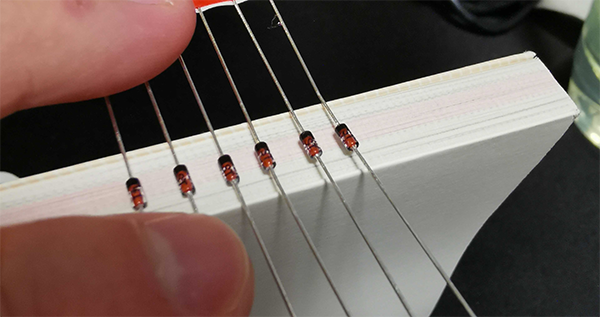
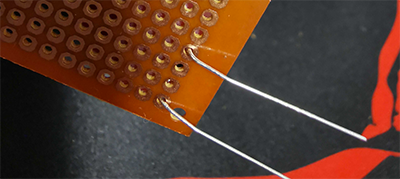
<p>I pain-stakingly bent each individual resistor to fit it into the board. A quick trick that will save you time is to find a book or edge and bend all the resistors at the same time. This will ensure you can quickly slide all the resisters into the pin holes on your board.</p>

<p><a href="/assets/img/mech-keyboard/mech-keyboard-resistor3.png"><img src="/assets/img/mech-keyboard/mech-keyboard-resistor3.png" alt="" /></a> <a href="/assets/img/mech-keyboard/mech-keyboard-resistor.png"><img src="/assets/img/mech-keyboard/mech-keyboard-resistor.png" alt="" /></a></p>

<p>Once you slide in the resistors into the board, bend the bottoms so they don’t fall out</p>

<p><a href="/assets/img/mech-keyboard/mech-keyboard-resistor4.png"><img src="/assets/img/mech-keyboard/mech-keyboard-resistor4.png" alt="" /></a></p>

<p>Afterwards solder the pin hole down and cut off the excess legging with wire cutters</p>

<p><a href="/assets/img/mech-keyboard/mech-keyboard-resistor5.png"><img src="/assets/img/mech-keyboard/mech-keyboard-resistor5.png" alt="" /></a></p>

<h3 id="soldering-on-the-key-switches">Soldering on the key switches</h3>

<p>Your kit should come with a plate where you can start mounting your switches to your board.</p>

<p><strong>Be careful at this step</strong>. Once you’ve decided on a layout you won’t be able to easily de-solder the key switches again. It’s possible, but will suck.</p>

<p><a href="/assets/img/mech-keyboard/mech-keyboard-solder-switch.png"><img src="/assets/img/mech-keyboard/mech-keyboard-solder-switch.png" alt="" /></a></p>

<p><em>Note, the black areas surrounding the larger keys are called<a href="https://deskthority.net/wiki/Stabiliser">stablisers</a> . These ensure longer keys like spacebar or backspace don’t fly off when pressed on the side. These are held in place through small holes in the PCB. At least, this was the case on my board.</em></p>

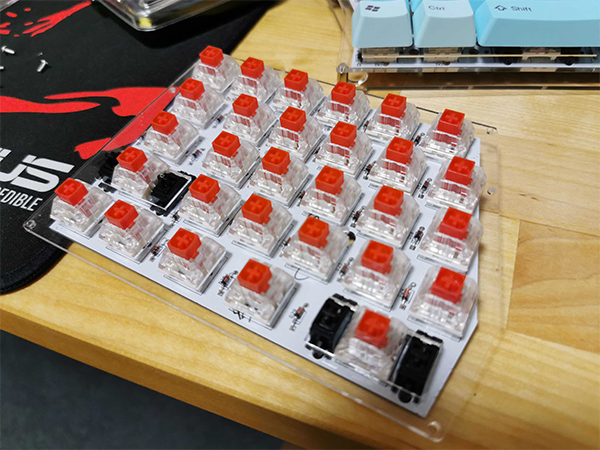
<p>Once you have decided on your choice of layout and swtiches you can start soldering the key switches onto the board. Also make sure the small white circle on the back of your key switch is flush against the backside of the PCB. I recommend using small clamps to hold the board in place before soldering.</p>

<p><a href="/assets/img/mech-keyboard/mech-keyboard-switch2.png"><img src="/assets/img/mech-keyboard/mech-keyboard-switch2.png" alt="" /></a></p>

<h3 id="flash-your-microcontroller">Flash your microcontroller</h3>

<p>Your kit should come with a microcontroller. The most popular microcontroller for keyboards looks like the <a href="https://www.sparkfun.com/products/12640">Arduino Pro Micro</a> .</p>

<p>I went a bit crazy when I built my first kit. I had soldered everything onto the board and plugged it in. Nothing. Keys were not registered. No LED lights. This is because <strong>most kits dont flash the microcontroller</strong>. You will need to flash the firmware onto the microcontroller otherwise nothing will work.</p>

<p>I used <a href="https://qmk.fm/">QMK</a> for flashing my microcontroller. This is a free open source project for hardware keyboards. Flashing the microcontroller is easy using QMK. You just plug it into USB and run the QMK software and select your keyboard model. Most hobby boards have their software already included in the <a href="https://github.com/qmk/qmk_firmware">QMK repository</a> so flashing is easy.</p>

<h3 id="soldering-on-the-remaining-components">Soldering on the remaining components</h3>

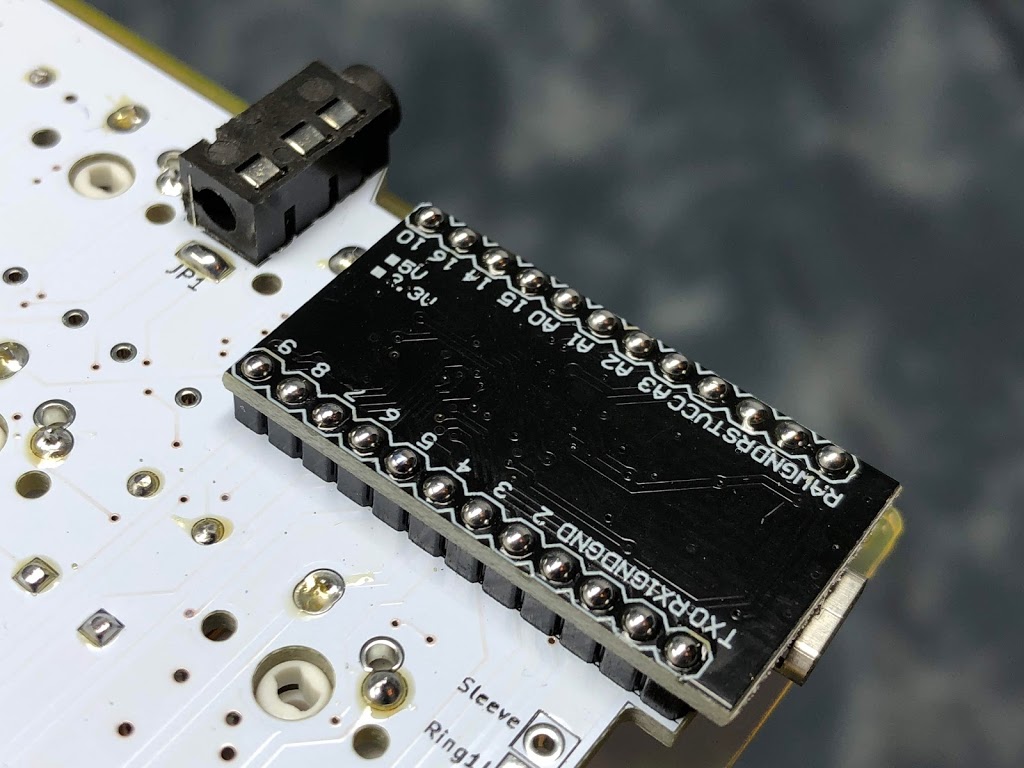
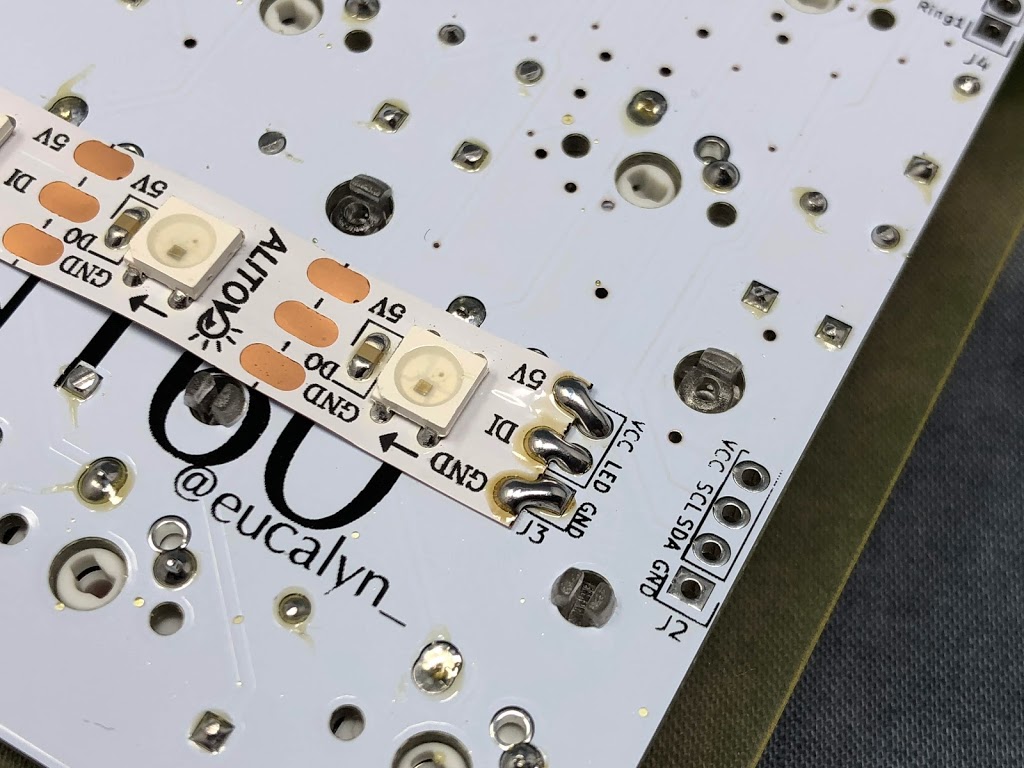
<p>After you made sure your microcontroller can be flashed its time to solder the rest of the components down. For me, this meant the TRRS audio jack for my split keyboard, a microcontroller, and a small RGB LED strip</p>

<p><a href="/assets/img/mech-keyboard/mech-keyboard-arduino.JPG"><img src="/assets/img/mech-keyboard/mech-keyboard-arduino.JPG" alt="" /></a> <a href="/assets/img/mech-keyboard/mech-led.JPG"><img src="/assets/img/mech-keyboard/mech-led.JPG" alt="" /></a> (image credit to <a href="http://eucalyn.hatenadiary.jp/entry/how-to-build-mint60">eucalyn’s</a> Mint60 guide)</p>

<h3 id="make-sure-your-key-switches-work">Make sure your key switches work</h3>

<p>Once your microcontroller has been flashed and soldered you can start testing each key switch. This is good idea before closing the keyboard up. If one key does not respond it may need to be resoldered. I had several switches which needed to be resoldered on my first build because I didn’t use enough solder.</p>

<p>After that you need some software for testing. If you are on OSX I recommend using <a href="https://pqrs.org/osx/karabiner/">Karabiner EventViewer</a> . Once installed you can check each individual key and make sure it maps to the correct key. A word of warning though the “fn” key will not register unless you press it in combination with another key.</p>

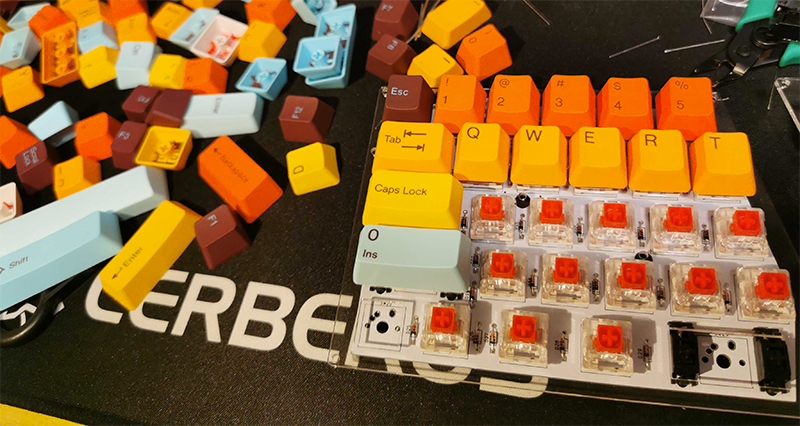
<h3 id="put-on-your-key-caps">Put on your key caps!</h3>

<p>Almost there! Once you’ve verified your board works you can start putting the key caps on it!</p>

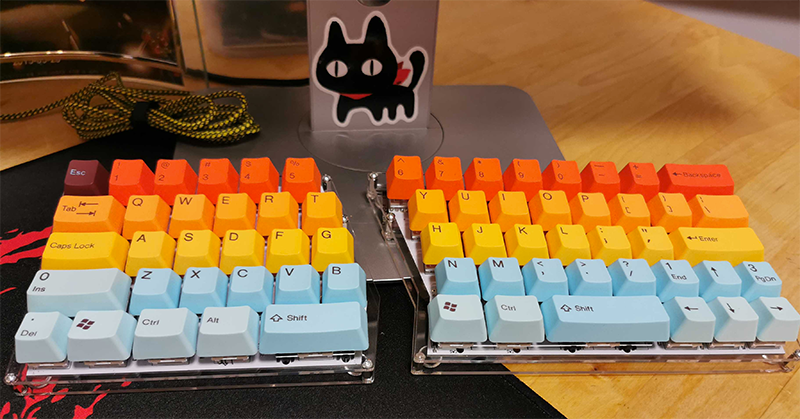
<p><a href="/assets/img/mech-keyboard/mech-caps.png"><img src="/assets/img/mech-keyboard/mech-caps.png" alt="" /></a> <a href="/assets/img/mech-keyboard/mech-keyboard-keycap.png"><img src="/assets/img/mech-keyboard/mech-keyboard-keycap.png" alt="" /></a></p>

<h3 id="customization-keymaps">Customization keymaps</h3>

<p>After you get your board setup you will want to start customizing the layout a bit. This is pretty simple once you can get QMK compiling locally. After you can compile the project you can simply modify the keymap inside QMK. I ended up modifying my <a href="https://github.com/qmk/qmk_firmware/blob/master/keyboards/mint60/keymaps/default/keymap.c">original keymap</a> with my own mappings.</p>

<p>I would defintely recommend reading the noob guide to QMK before jumping in to get an idea of the full set of features: <a href="https://beta.docs.qmk.fm/newbs/newbs_getting_started">https://beta.docs.qmk.fm/newbs/newbs_getting_started</a></p>

<h3 id="conclusion">Conclusion</h3>

<p>It turns out building a mechanical keyboard is actually not that difficult. I had a difficult time because I didn’t read my kits instructions and I paid for it with hours of de-soldering…</p>

<p>In the end, a keyboard is just a bunch of switches. The circuit is quite simple and easy to understand. It’s essentially a bunch of <a href="https://www.arduino.cc/en/tutorial/button">arduino buttons</a> rigged together if you’ve every done anything with the Arduino it should be quite simple.</p>

<p>Eventually I want to design my own PCB layout. However, for the time being I’m quite happy with form factors most hobby kits offer :)</p>]]></content><author><name>Richard Ramsden</name></author><category term="hardware" /><category term="keyboards" /><summary type="html"><![CDATA[I’ve been pretty interested in mechanical keyboards lately. Building one has been on my bucket list for awhile now so last weekend I decided to check out Yusha Kobo , a specialty keyboard store based in Tokyo which sells kits.]]></summary></entry><entry><title type="html">Goal Setting for 2020</title><link href="https://rramsden.ca/posts/goal-setting-for-2020/" rel="alternate" type="text/html" title="Goal Setting for 2020" /><published>2020-01-04T23:25:17+09:00</published><updated>2020-01-04T23:25:17+09:00</updated><id>https://rramsden.ca/posts/goal-setting-for-2020</id><content type="html" xml:base="https://rramsden.ca/posts/goal-setting-for-2020/"><![CDATA[<p>In 2013, I left Canada for a new life in Japan. I brought a laptop and a couple of pairs of clothes with me. I didn’t speak the language and had no job lined up. Because I had saved up some money, gotten my bachelor’s degree, and had the right work experience I was able to find a job.</p>

<p>It wasn’t a spontaneous decision to move to Japan. I loved Japan and had been planning most of my early 20’s on how to move there. I knew I needed a univeristy degree, so I got one. I also took some Japanese language classes along the way.</p>

<p>I am here today because I set goals for myself. I worked hard to achieve those goals and eventually was able to move to Japan. Having a strong goal can be a powerful thing and make you push to your limits.</p>

<p>Now that it’s 2020 I feel its time to start planning again much like I did in my early 20’s. I will set some new goals for myself. So, without further adieu.</p>

<h3 id="on-writing">On Writing</h3>

<p>The people I look up to are all great writers. They knew how to write and share their ideas with the world through their words. Writing is powerful, I know that now and want to improve.</p>

<p>I feel my writing skills have always been weak. Over the years I’ve written a few articles but could never really establish a habit to level-up my writing.</p>

<p>This year I want to <strong>write one blog post each month</strong> to improve my writing skill. Eventually, someday, I would love to write a book.</p>

<h3 id="on-reading">On Reading</h3>

<p>Going back to the people I admire, Bill Gates, who takes solo ‘think weeks’ in a cabin in the woods to consume books. Just like him I want to learn and apply knowledge from books to make real change in the world.</p>

<p>I plan to take my own ‘think week’ this year. I also plan to read at least 12 books by the end of 2020. I’ve setup <a href="https://www.goodreads.com/review/list/68416385-richard-ramsden?shelf=my-2020-reading-list">goodreads reading list</a> to track my progress.</p>

<h3 id="japanese">Japanese</h3>

<p>Someone I respect told me after 10 years of living in a foreign country if you still don’t speak the language you never will. This scares me. I’m seven years in to my life in Japan and not fluent yet.</p>

<p>My target for this year is to pass the <a href="https://jlpt.jp">JLPT N3</a> exam. I have passed N4 and N5 levels but it’s not conversational Japanese. The N3 is a big deal for me because it means I can hold my own when speaking Japanese. It’s really the point where I can say I can speak Japanese.</p>

<h3 id="on-my-health">On My Health</h3>

<p>Being healthier has loads of benefits. You sleep better, you feel better, and generally just have more energy to do awesome work.</p>

<p>I’m currently overweight and this is making me sleep worse which is degrading my life experience. This year I want to eat right and achieve a healthy target weight by the end of 2020.</p>

<h3 id="on-being-human">On Being Human</h3>

<p>The last decade I focused mostly on myself and my own ego. This year I want to help others and be more empathetic to other human beings. I also want to drop my ego.</p>

<p>So this year I will focus on making new friends and improving my existing relationships. As a leader of a team I want to mentor others and give everyone a chance to grow, beyond me.</p>

<h3 id="looking-forward">Looking Forward</h3>

<p>I think we all need some accountability if we want to acheive a goal. I definiately didn’t keep my Japan dream secret. I told everyone until a co-worker finally had enough and said “Why are you still here? Goto Japan already!”. I left pretty quickly after that. I imagine if someone didn’t hold me accountable thought if I would of ever had the courage to make a leap.</p>

<p>For a little bit of accountability I wrote this article. I see it as a way to publically tell the world I am serious this time and I will accomplish the goals:</p>

<ul>
  <li>To write one blog post a month</li>
  <li>To read one book once a month</li>
  <li>To take one ‘think week’ this year</li>
  <li>To live healthier (lose 8kg by end of 2020)</li>
  <li>To make new friendships and improve my current ones</li>
</ul>]]></content><author><name>Richard Ramsden</name></author><category term="personal" /><category term="writing" /><summary type="html"><![CDATA[In 2013, I left Canada for a new life in Japan. I brought a laptop and a couple of pairs of clothes with me. I didn’t speak the language and had no job lined up. Because I had saved up some money, gotten my bachelor’s degree, and had the right work experience I was able to find a job.]]></summary></entry></feed>